Key insights:
The problem: your sales team closes deals in HubSpot, contracts appear somewhere else
One of the most common patterns we hear from sales-led teams is this: the deal is done, the rep has marked it closed in HubSpot, and then someone sends an email asking legal or operations to sort out the contract. What follows is a manual process that sits entirely outside the CRM.
The Managing Director at a B2B travel platform described their setup in detail:
We then have standardised contract templates that sit in PandaDoc. When the deal moves to the contract stage, that acts as a trigger for HubSpot to pass data to Zapier, to pass data to PandaDoc, to populate the data fields such as contact name, company name, address, payment terms. All of that gets populated into the template in PandaDoc. It then gets sent out to the client.
This is a carefully designed process. It still has a structural problem: it depends on a third tool to bridge two systems that could talk directly to each other. Every extra handoff is a potential point of failure. And that failure risk grows with volume. The team was running around 40 contracts a month at the time of that conversation. Their target was 100 a month by the following quarter. At that scale, a three-tool chain becomes a real operational risk.
For teams without even that level of automation, the gap is wider. A lawyer at a hospitality group described it plainly:
An executive is not around and I have to delay a bit. So sometimes we end up losing on important business agreements because of that.
The approval bottleneck is not a people problem. It is a process architecture problem. When approvals live in inboxes rather than in a defined workflow, delays are built into the system. For a structured look at how approval delays compound across the full contract lifecycle, see the contract management challenges guide.
The problem, in plain terms, is this: a deal closes, but no contract follows. Work starts, invoices go out, and the contract is still sitting unsigned somewhere. One Precisely customer found themselves chasing a signature after an invoice had already gone past due. There was no signed agreement in place. That situation is exactly one example of what this guide is here to prevent.
What HubSpot contract management looks like with Precisely
Precisely connects to HubSpot as an out-of-the-box integration, available without custom development. Any defined condition is met in HubSpot, Precisely triggers contract creation automatically. The contract is built from a pre-approved template and populated with data pulled directly from the HubSpot deal record.
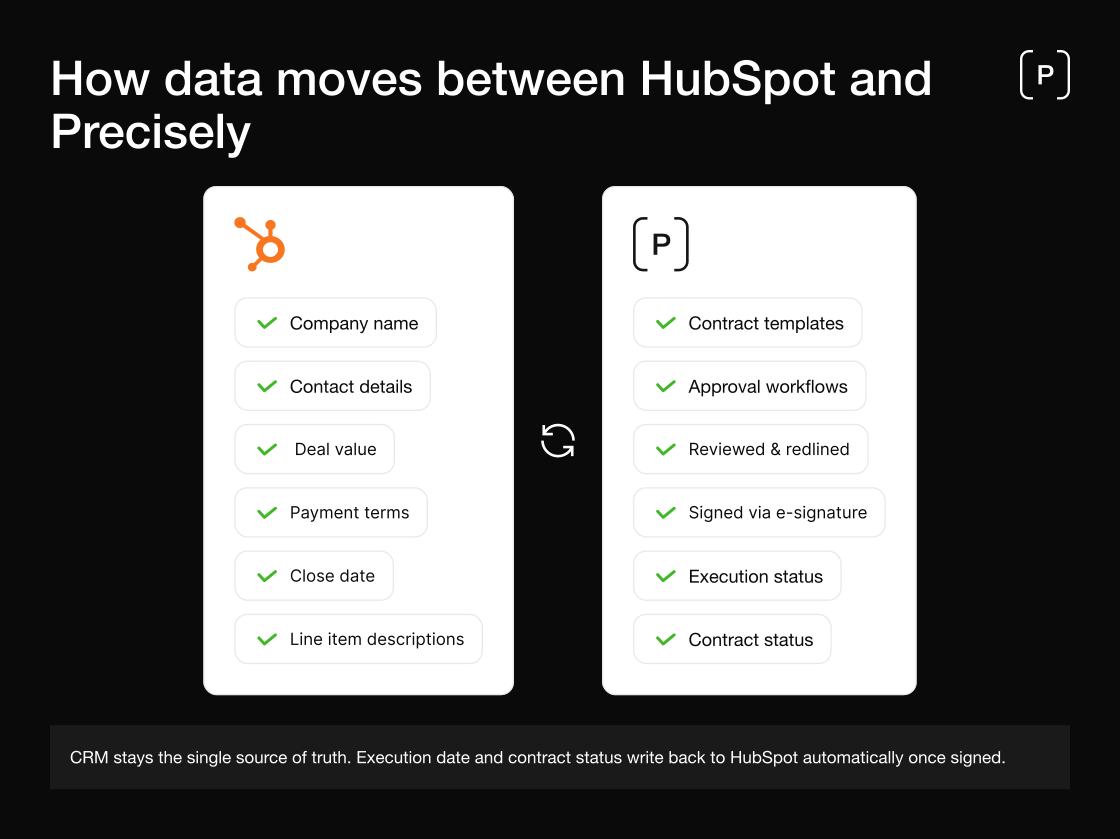
The integration supports a bidirectional flow. Data moves from HubSpot into Precisely to populate the contract. Once the contract is signed, key metadata, including execution date and contract status, can be written back into HubSpot, keeping the deal record complete and the CRM the single source of truth.
This is not a surface-level connection. The HubSpot deal and the Precisely contract stay linked throughout the lifecycle. Renewal reminders, obligation tracking, and post-signature visibility are all managed in Precisely, with the relevant updates accessible in HubSpot.
Step-by-step: from closed deal to signed contract
Step 1. Deal moves to the contract stage in HubSpot
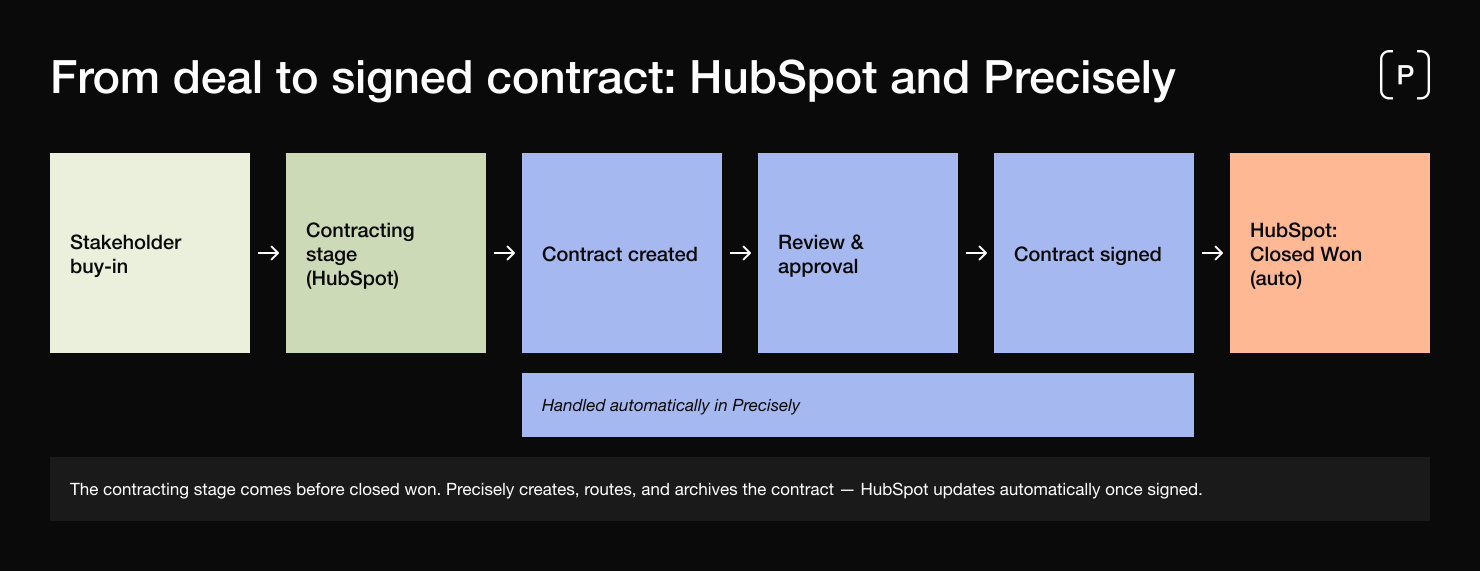
In a typical Precisely-connected workflow, contracting happens before the deal is marked as closed won. Once stakeholder buy-in is secured, Precisely creates and routes the contract for review and signature. When the contract is fully signed, HubSpot can be updated to reflect the deal as closed won automatically. The trigger can be based on any property in HubSpot, and connected to the relevant approval workflow in Precisely.
Step 2. Precisely creates the contract automatically
Precisely pulls the relevant fields from the HubSpot deal record and populates the appropriate contract template. The fields that map across typically include company name, contact name, email address, deal value, payment terms, start date, and, for product-led teams, line item descriptions.
Pulling line item data rather than only top-level deal fields is what distinguishes a genuine integration from a basic one. Any fields not present in HubSpot can be collected at this stage through a short questionnaire built into the Precisely template. The rep answers a few questions and those answers flow into the document. These additional fields are collected through Precisely's built-in contract questionnaire, which prompts the user to answer a short set of questions when initiating the contract. The answers flow directly into the contract template.
Step 3. Internal approval runs before the contract leaves the business
Once populated, the contract enters the approval workflow defined in Precisely. This may be a single legal sign-off for standard agreements, or a multi-stage process for higher-value deals. Approvers are notified automatically. They review and approve in Precisely, and the workflow advances without manual coordination. Approval rules can be conditional: contracts under a certain value route to one approver, whilst above that threshold a different chain is triggered. The logic is set once by an admin and runs automatically from then on.
Step 4. The contract is sent for e-signing
Once approved, the document is sent for electronic signature directly from Precisely. Signers receive a secure link via email and can sign from any device without creating an account. Signing order can be defined: internal first, then external, or parallel if the contract type allows. Every signing event is recorded with a full audit trail, including timestamp and email verification.
Step 5. The signed contract is archived and HubSpot is updated
Once all parties have signed, the finalised document is stored automatically in the Precisely archive with metadata attached: execution date, renewal date, contract value, parties. If configured, contract status and execution date are written back into the HubSpot deal record. The deal is complete. The contract is governed. The CRM is current.
Use cases: where teams apply this flow
Sales contracts triggered by deal stage. The primary use case. A standard sales agreement is generated automatically when a deal reaches the contract stage. The rep's role ends at closing. The contract process runs without manual intervention.
NDAs initiated from HubSpot contact records. For teams managing pre-sales conversations through HubSpot, Precisely can trigger an NDA when a contact or company record reaches a defined stage. The NDA is populated with prospect details and routed for e-signature before substantive discussions begin.
Partner and reseller agreements. Teams managing partner relationships through HubSpot can use the same trigger-based creation flow for partner agreements, including separate templates for different partner tiers or regions.
Renewals tracked from Precisely, visible in HubSpot. When a contract approaches its renewal date, Precisely generates the renewal document, routes it for approval, and sends it for signing. The outcome is written back into HubSpot, keeping renewal history accurate without manual updates.
What the integration allows you to automate
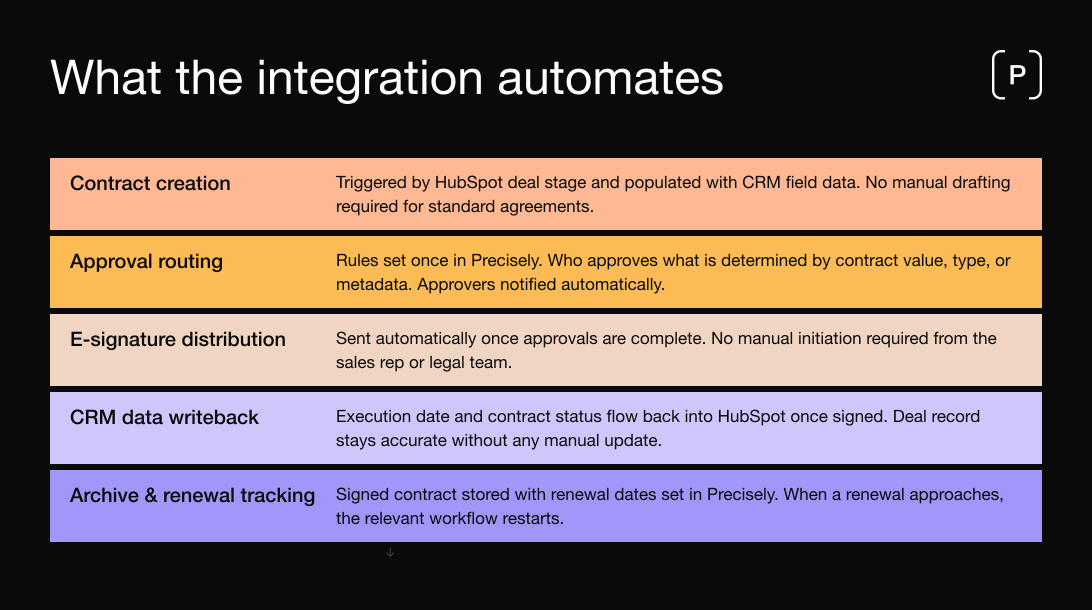
The value of the integration is not only that data flows between tools. It is that the entire contracting process, from creation to signature, can run without anyone actively managing it.
Contract creation is triggered by a HubSpot deal stage and populated with CRM field data. No manual drafting is required for standard agreements.
Approval routing follows rules set in Precisely. Who approves what is determined by contract value, type, or other metadata. Approvers are notified automatically and reminded if they have not acted within a defined window.
E-signature distribution is sent automatically once approvals are complete. No manual initiation is required from the sales rep or legal team.
CRM data writeback means that execution date and contract status flow back into HubSpot once signed, keeping the deal record accurate without any manual update.
Archive and renewal tracking in Precisely store the signed contract with renewal dates set. When a renewal approaches, the relevant workflow restarts.
A Project Manager Associate at a professional services firm described what happens without this structure:
Sometimes we start at the same time creating the contract and using our system, but for the daily process, the correct steps to do so is to start by filling the opportunity process.
Running the CRM and the contract process simultaneously, without a formal link between them, creates risk. The Precisely integration resolves this by making the two sequential and connected.
How this compares to managing contracts natively in HubSpot
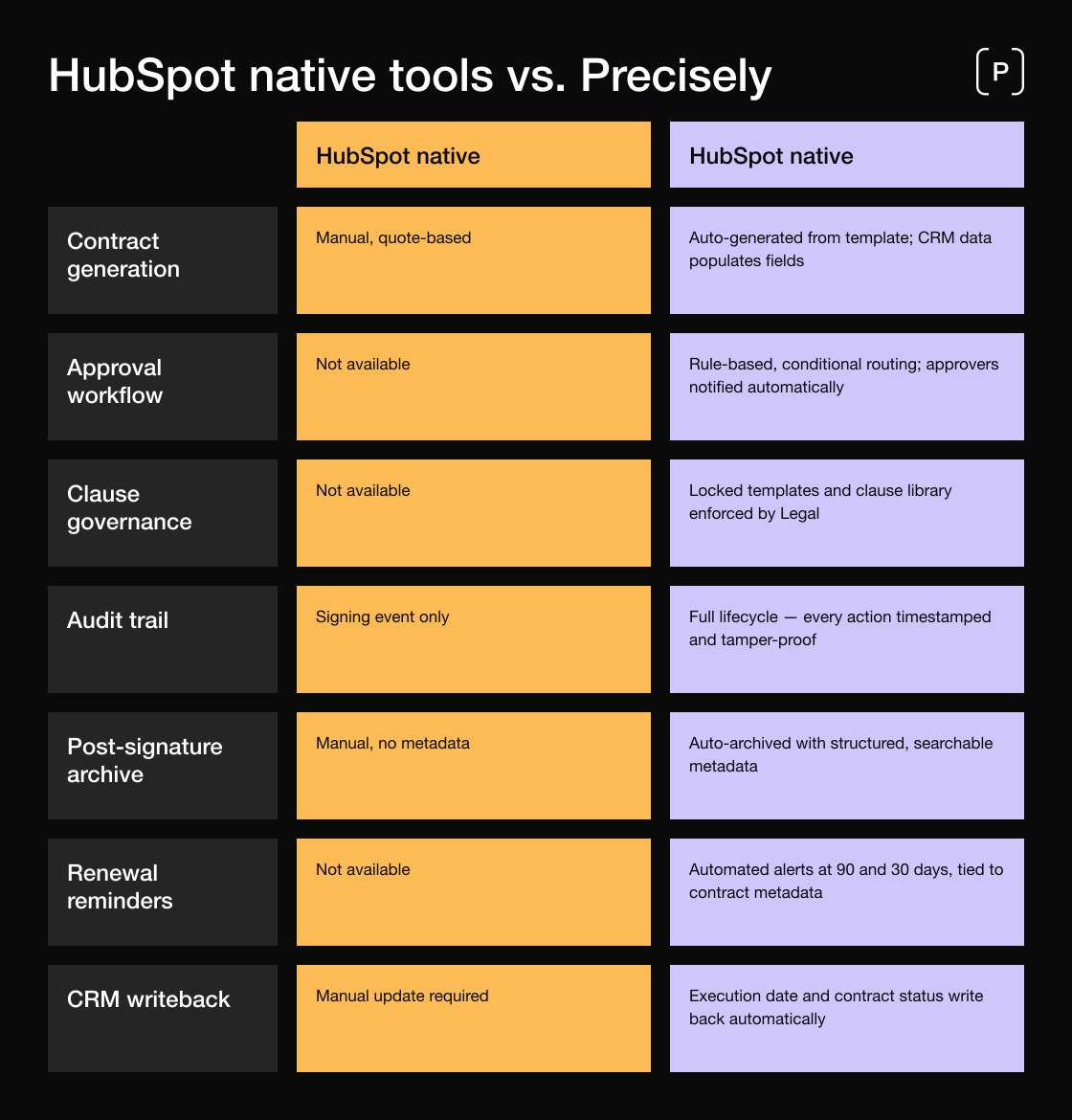
HubSpot includes document functionality through its Quotes and Documents tools. For simple use cases, a single-page quote or a standardised proposal, those tools are adequate. They have structural limits, however, that become apparent as contract complexity or volume increases.
HubSpot's native document tools are built for sales collateral, not contract governance. There is no approval workflow engine. There is no clause library that enforces legal standards. There is no audit trail that records who approved what and when. Documents created in HubSpot Quotes are sales documents that can serve as the basis for an agreement, but the governance structure, version control, and post-signature lifecycle management that contracts require are not present.
Precisely is built for that governed layer. Legal can set the rules once. Sales works within them. Every agreement is already compliant before it is sent, because the template and the approval logic are defined by Legal in advance. For a full comparison of what CLM platforms provide beyond basic document tools, see the Contract Lifecycle Management guide.