Key insights:
What is contract management software?
Contract management software is a platform that governs how contracts are created, reviewed, approved, signed, stored, and monitored throughout their lifecycle. It replaces the disconnected combination of Word documents, email threads, shared drives, and spreadsheet trackers that most organisations rely on by default.
The core function is not automation, it is structure. A contract management platform enforces process by design: every agreement follows a defined path, every version is tracked, every approval is logged, and every renewal date is visible to the right people at the right time. For more on what this means in practice, see our guide to contract lifecycle management.
The term is used interchangeably with CLM (contract lifecycle management), contract management platform, and contract automation software. They refer to the same category of tool, with different vendors emphasising different parts of the lifecycle.
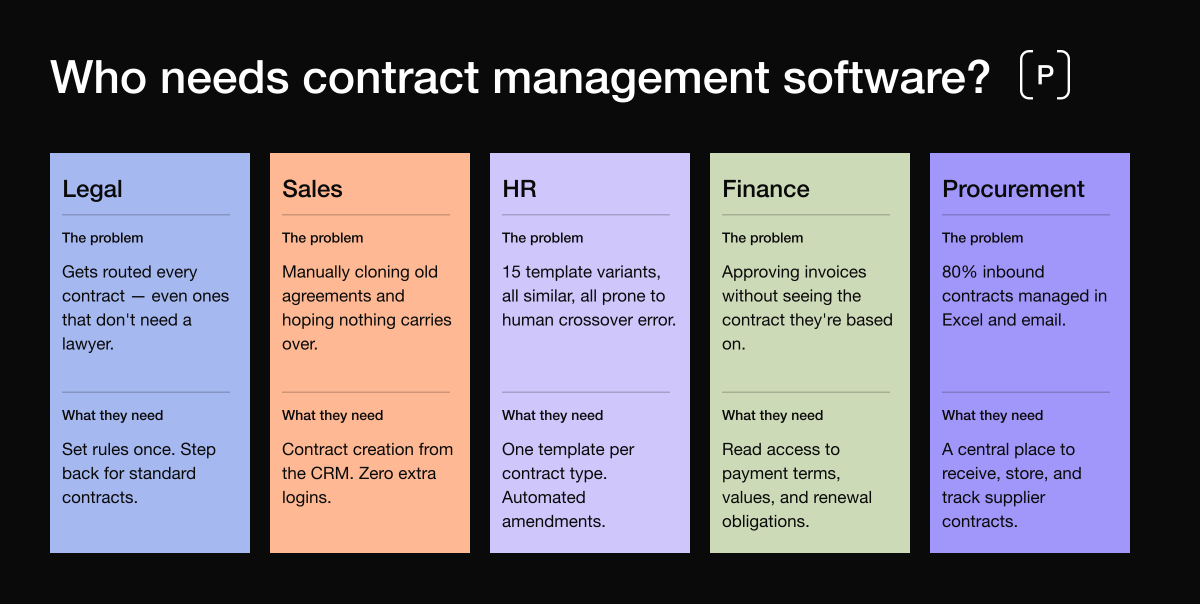
Who needs contract management software?
The honest answer is: every team that creates, receives, or is affected by the terms of an agreement. In practice, that means most of your organisation but each department has a different relationship with contracts, and a different problem to solve. It is also a matter of scale. Smaller organisations with less contracts might be more able to manage their contracts in a manual way.
Legal: The reluctant gatekeeper
Legal's problem is not a lack of contracts. It is a lack of escape from them. In most organisations without a CLM, legal is the bottleneck for every agreement that leaves the business because they are the only team with the process knowledge and the access to do it correctly.
A solo lawyer at a 400-person company described the situation plainly: contracts arrived on her desk from every direction, she saved them wherever she could, and approvals were routinely missed because the volume exceeded what two people could track.
"I will save stuff whenever it comes across my desk. But I might be involved during the drafting and then the signature comes along and people forget to send me the documents — and given the volume, I'm not really able to catch up with them."
What legal actually needs from a CLM is not more involvement, it is less. Set the rules once. Build the templates. Define the guardrails. Then let the business operate within them without routing every standard contract through legal for review. For legal teams looking to build that kind of scalable function, the Legal Operations Management guide covers how to structure the function, what KPIs to track, and when a CLM becomes the right investment.
Sales: Speed over everything
Sales teams have the highest volume of contract interaction and the lowest tolerance for friction. Their relationship with contracts is purely transactional: get it drafted, get it signed, move to the next deal. Any process that slows that down costs pipeline.
The problem is that Sales often manages contracts the wrong way: manually cloning a previous agreement, hoping nothing carries over from the last deal, and sending it out via DocuSign without any version control or audit trail. As one sales operations leader described it, her team were going
"back and manually cloning a previous contract, hoping there's not something that snuck in there."
The critical insight for Sales is that contract management software only gets adopted if sales teams never have to leave their CRM. If the integration requires a separate login, the tool will not get used. The more steps you remove, the more adoption you get.
HR: Volume, repetition, and dangerous variation
HR's contract problem is structurally different from Sales or Legal. It is not about speed or control, it is about repetition at scale with high-stakes variation. Every hire is a new contract. Every amendment to salary or role requires a new document. And every contract differs by type, jurisdiction, seniority, and employment terms.
One HR manager in healthcare recruitment described a matrix of 15 different contract templates — fixed term, permanent, relief, specified purpose — each varying by discipline and department. Her team of three was producing five to ten contracts a week, entirely by hand.
"Even though I'm good at it, human error when I'm looking at team and head and nursing and physio, there could be a crossover. I just want to eliminate mistakes."
For HR, the value of a contract management platform is standardisation. One template per contract type. Automated amendments that pull from the existing record. No crossover errors between similar-but-different document variants.
Finance: The post-signing orphan
Finance has an underrepresented but commercially significant relationship with contracts. They are not involved in drafting or approvals but they live with the consequences of contract terms every day. Invoice amounts, payment schedules, renewal obligations, SLA penalties. Without contract visibility, they are approving invoices against agreements they have never seen.
One legal operations professional described finance's exact problem:
"After signing, the finance team needs to get a lot of information — if we are paying a partner, or if we'll be having some income, what are the due dates for the invoices and so on. They are in the contracts, but they don't really have the capacity and time to go through each contract and find the information."
Finance does not need drafting rights. They need read access, structured metadata, and automated alerts when something deviates from what was agreed.
Procurement: The third-party intake problem
Procurement's relationship with contracts is almost entirely inbound. They do not draft, they receive supplier terms, negotiate on someone else's paper, and manage a portfolio of vendor relationships where the terms were never standardised to begin with.
One purchasing manager at a 1,000-person company described the situation without ambiguity:
"80% of the time we sign the supplier's contract. We manage with Excel files, save documents on the computer, and it's a little bit difficult because sometimes we miss deadlines."
The deeper issue for Procurement is that negotiators often do not understand contract terms well enough to negotiate beyond price. One procurement specialist described the gap:
"In supplier negotiations, there's so much you could negotiate on beyond price — service level agreements, credits, dates — but those things get neglected for the sheer reason that the person running the negotiation doesn't have the legal understanding to get what the contract says."
A CLM platform gives Procurement a central place to receive and store inbound contracts, with renewal alerts, obligation tracking, and enough structured metadata to negotiate with confidence.
Core features to look for in contract management software
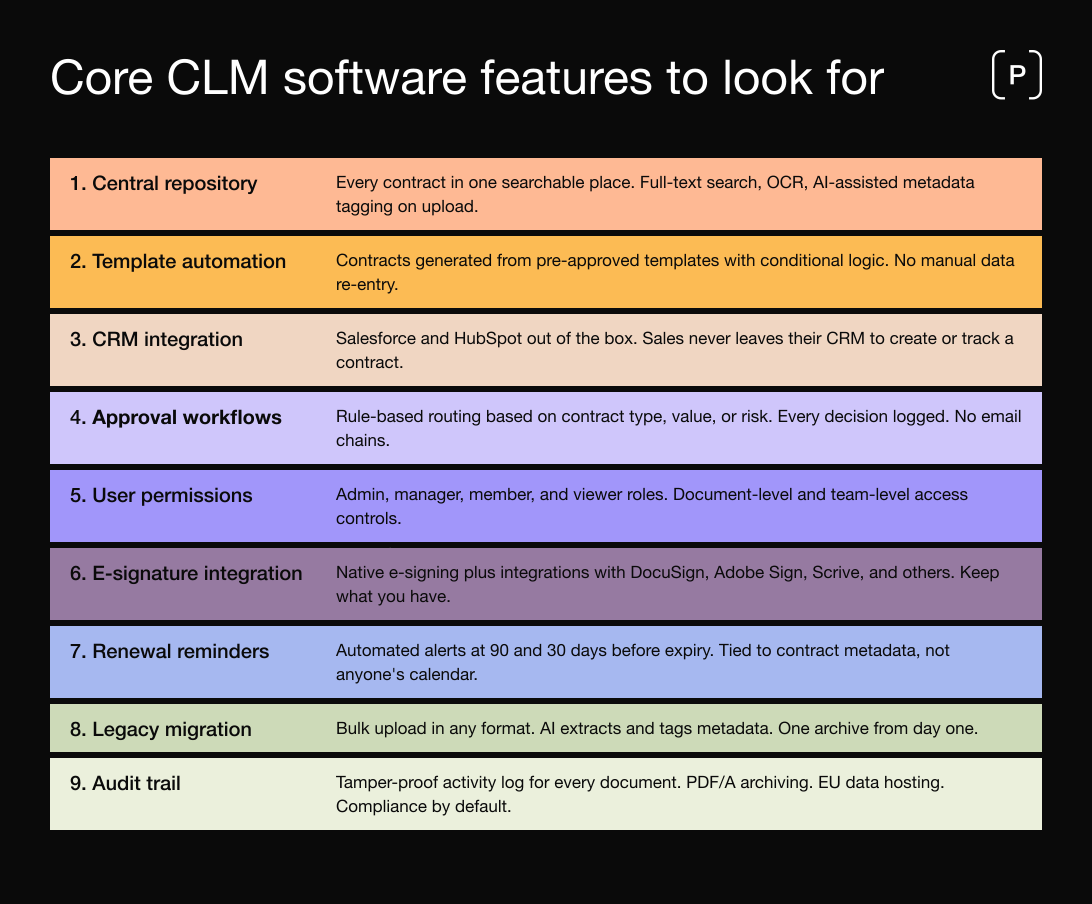
The features that buyers consistently ask about in discovery calls are not the ones that appear on most vendor feature lists. Here is what actually matters.
Central contract repository with full-text search
The most-requested feature across every evaluation call is a central place where every contract lives and can be found. Good repositories offer full-text search including scanned documents via OCR, filter by metadata such as counterparty, contract type, status, value, and date, and role-based access so finance can see commercial terms without accessing confidential HR agreements. AI-assisted metadata extraction, where the platform automatically identifies and tags counterparty name, dates, and key clauses on upload, turns even legacy contract archives into searchable, actionable data.
Automated contract generation from templates
Manual contract creationm, cloning a Word document, editing fields by hand, copying in CRM data, is where most errors occur and most time is lost. Contract management software replaces this with automated generation from pre-approved templates that use conditional logic to include the right clauses based on deal type, jurisdiction, or counterparty. The key capability here is conditional logic: a template that automatically includes the right clause for certain project types, applies the correct jurisdiction, or populates payment terms from a standard rate card.
CRM integration (Salesforce, HubSpot)
The most-asked feature question across all evaluation calls, without exception. Sales teams will not adopt a contract platform that requires them to leave their CRM. The correct architecture is: Sales enters deal data in Salesforce or HubSpot, the CLM generates the contract from that data, and the signed agreement flows back into the CRM record. No re-entry. No switching tools. No version divergence between the quote and the agreement.
Role-based approval workflows
Approval workflows are where most contracts go to die. When approvals are routed manually via email, every step is a point where the contract can sit unread in someone's inbox. Good contract management software automates approval routing based on configurable rules: contract type, value, counterparty risk, or any other metadata field. Approvers receive direct notifications and can act from within the platform. Every decision is logged. For contracts that meet pre-defined criteria, auto-approval rules remove unnecessary manual steps entirely.
Configurable user permissions
Legal teams consistently cite permission control as a non-negotiable requirement, for two reasons. First, confidentiality: not every team should be able to access every contract. Second, control: the template logic and clause library that Legal has carefully built should not be editable by a sales representative. Good permission architecture distinguishes between admin, manager, member, and viewer roles, with document-level, folder-level, and team-level access controls.
E-signature integration
Almost every organisation already has an e-signature tool in place. The question is not whether the CLM supports e-signatures, but whether it integrates with the existing provider without requiring a switch. A platform that forces organisations to abandon their existing e-sign workflow creates unnecessary friction. The right answer is a platform with native e-signing capability and out-of-the-box integrations with the major providers, so organisations can keep what they already have.
Automated renewal reminders
Renewal management is one of the highest-stakes post-signing capabilities. A legal team described being locked into an auto-renewing contract for an additional 18 months, with real financial consequences, because no system was tracking the end date or notice period. Good CLM platforms send automated reminders at configurable intervals, typically 90 and 30 days before expiry, tied to contract metadata rather than to individual calendar entries.
Legacy contract migration and bulk upload
Organisations are unwilling to maintain two separate archives, old contracts in SharePoint, new ones in the CLM, because that defeats the purpose of centralisation. Good platforms support bulk upload of existing contracts in multiple formats, with AI-assisted metadata extraction that automatically tags uploaded documents. The result is a single searchable archive covering everything from legacy paper agreements to current active contracts.
Audit trail and compliance features
For any organisation subject to GDPR, DORA, or audit requirements, the audit trail is not optional. Every action, who created the document, who approved it, who changed a clause, who signed it and when, must be recorded and tamper-proof. Good CLM platforms maintain detailed activity logs for every document, archive signed contracts in PDF/A format for long-term legal validity, and host data within the EU to satisfy data residency requirements. For more on what this means in practice, see our guides on contract management security and GDPR and contract management.
How to evaluate contract management software vendors
Most organisations approach CLM evaluation the wrong way: they look at feature lists, watch demos, and choose based on price. The buyers who make the best decisions ask a different set of questions.
Ask: Was this platform built archive-first or workflow-first?
This is the most important structural question in any CLM evaluation, and almost no buyer asks it. Many CLM tools started as e-signature platforms, document editors, or approval workflow tools and added a contract repository later, as an afterthought. The result is a platform that is strong at creating contracts but structurally weak at managing the ones you already have.
One experienced CLM partner in the Nordics described the architectural problem with a major competitor:
"They built upon different kinds of workflows — on top of whatever you had, if that was Google Drive. Smart from a commercial perspective. But that also means that you haven't built an architecture with post-contracting in mind. So they added the archive or repository afterwards, after year two or three."
If your primary need is post-signing management, finding existing contracts, tracking renewals, monitoring obligations, you need a platform where the archive is the foundation, not a feature added after-the-fact.
Ask: Can non-legal users create contracts without legal involvement?
This is the adoption question in disguise. If the answer is "yes, but only after significant setup," press for specifics. How complex is the template builder? Can Sales trigger contract creation directly from the CRM? The best answer to this question is a live demonstration where a non-legal user creates a contract from a template in under five minutes.
Ask: What does implementation actually involve?
The fear of implementation complexity is the single most common reason organisations delay buying a CLM. Ask for a specific implementation timeline, a named customer success manager, and references from organisations of similar size and contract volume. A 90-day structured implementation with milestones, dedicated support, and training for non-legal users is a reasonable expectation. An implementation that is entirely dependent on your IT team is a warning sign.
Ask: How do you handle data migration from our existing systems?
Migration from SharePoint, Google Drive, a shared network drive, or a physical archive is a real project, and it needs a clear process: bulk upload, metadata extraction, validation, and verification that nothing was lost. Ask the vendor to walk you through how they have done this before, with a reference from a customer who migrated a similar volume of contracts.
Ask: What do other non-legal users say about it?
Legal will use almost any CLM. The question is whether Sales, HR, Procurement, and Finance will. Ask specifically for references from non-legal users. Ask what percentage of contracts in the reference organisation are created by teams outside legal. If the answer is "most contracts still go through legal," adoption has not happened.
Common mistakes when choosing contract management software
Mistake 1: Buying cheap and assuming it will work
The most damaging version of this mistake: a legal team at a scale-up spent four months trying to set up an inexpensive CLM.
"Their tool is extremely cheap, but we can't make use of it at all. So what we don't pay in money, we're paying in time. I spent maybe four months trying to set it up. And then even when it was set up, things were not working, we couldn't get the filters to do what we needed — you get on the tool and nothing works."
They had no CLM experience, so they could not evaluate what they were buying. The lesson: involve someone with CLM buying experience in the evaluation, or use a structured framework to assess platforms before committing.
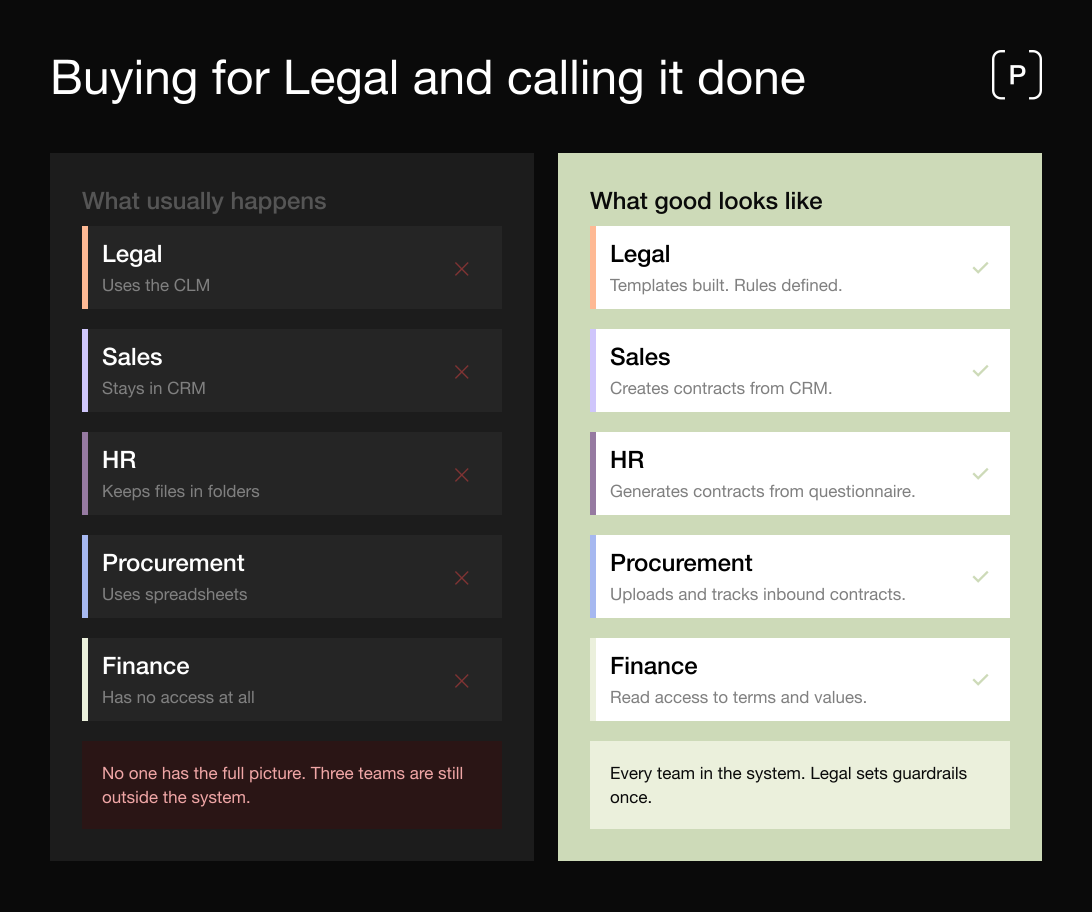
Mistake 2: Buying for Legal and calling it done
The most common failure mode across every implementation story is this one. A legal team buys a CLM. Legal uses it. Nobody else does. The system that was supposed to solve fragmentation creates a new silo. One legal counsel described a system that had been in place for years:
"It's more like a database than really a system. Nobody likes to use it and therefore nobody does use it."
The cause of death: manual data entry, no benefit for the end user, no reason for anyone outside legal to engage. The fix is not better change management. It is better design. See our guide to contract management best practices for more on what organisation-wide adoption actually looks like.
Mistake 3: Underestimating what templates require
Template-based contract generation is the highest-value feature in any CLM. It is also the most underestimated implementation task. One senior legal professional described the concern clearly:
"A lot of success will be determined by how complex your templates are and what the lead time is of the templates you need to implement. We have documents with almost 200 pages — the lead time to implement conditional logic in that is quite long."
Ask the vendor to estimate the implementation time for your three most complex templates before you sign.
Mistake 4: Forcing users into the CLM's interface
The most successful CLM deployments are often those where most users never log in to the CLM directly. Instead, they interact with contracts through tools they already use, Salesforce, HubSpot, a web form, and the CLM processes everything in the background. One current customer routed everything through an existing form tool his staff already knew, which fed into the CLM, rather than asking staff to learn a new platform.
"People are afraid of starting a new system."
The CLM handles all the processing, governance, and storage but the user experience for non-legal teams is familiar and friction-free.
Mistake 5: Treating price as the primary criterion
Per-user pricing in CLM platforms can feel expensive when the platform has not yet been deployed. The right framing is not "how much does this cost?" but "how much does the current situation cost, and what is the value of fixing it?" For a sense of what this looks like in practice, see our CLM savings examples and ROI guide.
How Precisely approaches contract management
Precisely is a European CLM platform built for organisations that want to govern contracts across the entire lifecycle, from initial request through to post-signing obligation management, without requiring a dedicated legal team to manage the process for every department.
Archive-first architecture. Precisely was built with the contract repository as the foundation, not as a feature added later. Every contract, whether created in the platform or uploaded from an external system, is stored in a single searchable archive. When a contract is uploaded, Precisely's AI reads the document and suggests the key metadata: counterparty name, contract type, dates, value, and other relevant fields. The user validates and confirms those suggestions rather than entering data from scratch, which means the archive stays accurate without creating manual data entry work. Full-text search, advanced filtering, and role-based access are available from day one.
Self-service for non-legal teams. Precisely's template engine uses conditional logic and questionnaire-based workflows so that Sales, HR, Procurement, and Finance can generate compliant contracts without Legal involvement for standard cases. Legal builds the templates and defines the guardrails. Business users operate within them. CRM integrations with HubSpot and Salesforce mean sales teams never need to leave their existing workflow.
Adoption-first design. Precisely is built around the modern business user, not the legal professional. No-code template configuration, intuitive approval routing, and a 90-day structured onboarding program are designed to ensure adoption reaches across the organisation, not just within the legal team.
EU hosting and compliance by design. Precisely is hosted on Google Cloud in Frankfurt, Germany, with data backups stored in Finland and signed documents archived in Dublin. GDPR compliance, data sovereignty, and EU residency requirements are met without additional configuration. Signed contracts are archived in PDF/A format. Every action is logged in a tamper-proof audit trail.
If you are already clear on your software requirements and want to understand what challenges to expect in practice, see our guide to the six biggest contract management challenges.