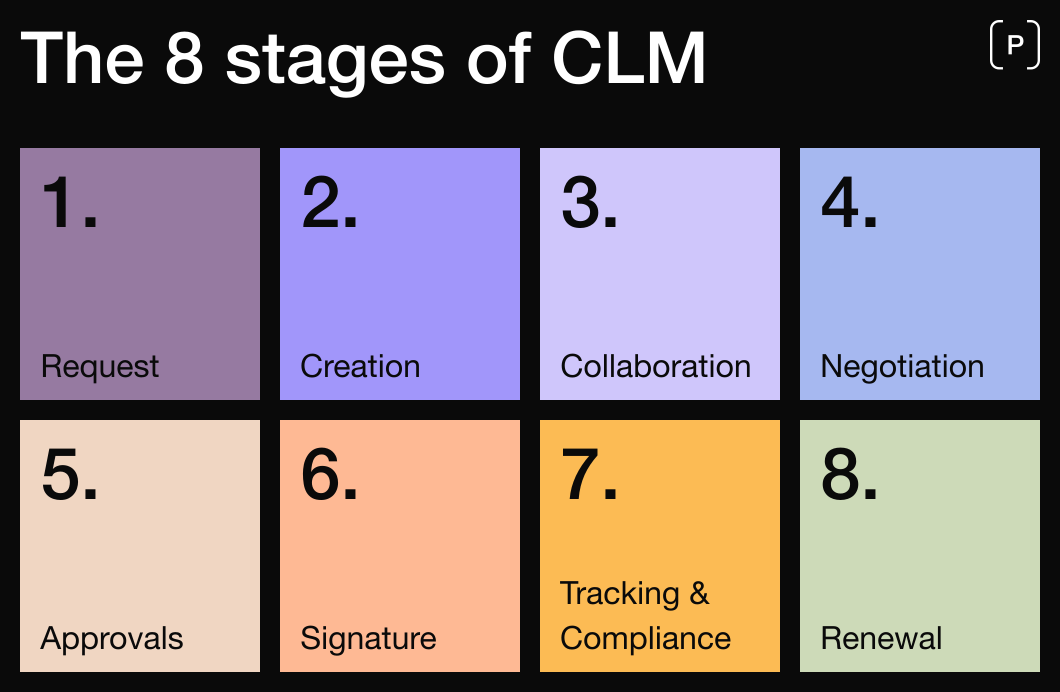
Contract Lifecycle Management (CLM) is a structured way to manage a contract from the first request through drafting, negotiation, approvals, and signature, and then through obligations and renewal. A modern CLM platform brings these steps into one flow, giving Legal clear control over templates, rules, and approval paths. Teams no longer need to move between email, Word, shared drives, and e-sign tools. The result is faster cycles, fewer mistakes, and a complete, trustworthy record of how each contract was created and approved.
While CLM is often described as a process, in practice it is typically supported by contract management software designed to bring more structure, automation, and control to each stage of the contract lifecycle. Without the right tools, organizations often rely on fragmented workflows across email, documents, and disconnected systems, making it difficult to scale contract operations effectively.
Who this is for
This guide is for teams starting to evaluate Contract Lifecycle Management (CLM): Legal, Sales, Finance, Procurement, and leadership. If your contracts live in inboxes and shared folders, or you’re not sure which version is “final”, you’re in the right place.
It is particularly relevant for organizations exploring contract management software or CLM tools to replace manual, fragmented contract workflows and gain more structure, control, and visibility across the contract lifecycle.
Key takeaways
Contract Lifecycle Management (CLM) covers the full contract lifecycle, from initial request through drafting, negotiation, approvals, signature, and renewal
Contract management software enables organizations to structure, standardize, and control contract workflows across the entire lifecycle
Contract automation reduces manual work by automating contract creation, approval workflows, and execution, improving both speed and consistency
Contract review and contract redlining become structured and traceable processes, reducing version confusion and negotiation delays
A centralized CLM platform creates a single source of truth for all contract data, improving visibility, compliance, and reporting
By implementing CLM, organizations can reduce contract cycle times, minimize risk, and scale contract operations more effectively
What a CLM is and what it actually does
Without CLM, contract work is scattered: drafts in Word, redlines in email, signatures in a separate tool, and final copies in a folder nobody can find.
With CLM, that same work lives in one system. A request captures the few details that change risk or content; the platform selects the right template and applies clause rules so the first draft is close to your policy; negotiation happens against standard language with pre-approved fallbacks; approvals follow rules instead of inbox chasing; signature is handled inside the platform; and the signed record powers obligations, renewals, search, and reporting.
In practice, this is made possible through contract management software that connects each step into a structured and automated workflow, reducing fragmentation and improving consistency across the contract lifecycle. If these pain points sound familiar, start with: 7 Common Contract management challenges and How to Overcome Them
Stages of CLM (3 vs 8: how to think about them together)
There are two common ways of describing the CLM lifecycle. They cover the same journey at different levels of detail.
The 3-stage view (good for orientation)
The contract lifecycle is often summarized in three stages: pre-signature, signature, and post-signature.
Pre-signature (create and agree) Everything before anyone signs. A request is raised (often from CRM) with the details that matter. The system selects the right template, fills basics, and applies clause rules so the first draft starts near “right.” Negotiation uses standard positions and pre-approved fallbacks. Approvals are triggered by rules (price, discount, data, jurisdiction), so the right people weigh in without email chasing. The goal is a correct agreement the business can accept quickly. For practical guidance on contract templates, see Contract templates: A Practical Guide for Legal and Business Teams
Signature (execute) Signing sits inside the same workflow. You prepare, send, and track every e-signature in the CLM platform, and status updates sync automatically to the contract record. When both parties sign, the system stores the final PDF together with key metadata such as signer identities, timestamps, and required fields for reporting or audit. This keeps every contract complete, traceable, and governed from start to finish.
Post-signature (perform and renew) A signed contract creates work: obligations to meet, services to deliver, data to protect, invoices to issue, renewals to plan. CLM turns that into tasks with owners and dates, keeps amendment history clean, and shows what renews next quarter.
The 8-stage view (good for configuration and measurement)
The 8-stage view is a more detailed breakdown of the contract lifecycle and is typically used to configure workflows, assign ownership, and measure performance across each stage of the contract lifecycle.
1) Contract request (initiation)
Before a contract can be created and managed, it needs to be requested. This stage captures the business context and decides which contract path to take.
Without CLM platform Requests arrive by email or ad-hoc forms. Key details (value, data processing, jurisdiction) are missing, so Legal chases context and restarts are common.
With CLM platform A short intake asks only for details that change risk or content (counterparty, what’s being sold/bought, values/discounts, data, governing law). Using integrations, intake can trigger from CRM so reps don’t switch tools. The inputs determine the right template and approval path.
2) Contract creation (authoring)
The first draft is produced, reflecting policy, commercial terms, and the context from intake.
Without CLM platform Typically, a Word file is cloned; names and numbers are typed in manually; old clauses are copied forward and drift from policy.
With CLM platform The system selects the correct template, auto-fills variables, and pulls standard wording from a clause library with one or two approved fallbacks.Non-legal teams can self-serve safely; Legal focuses on exceptions.
3) Internal review & collaboration
Stakeholders inside your company read, comment, and propose changes before anything goes to the counterparty.
Without CLM platform Multiple versions circulate by email. Comments conflict, edits are missed, and time is lost merging documents.
With CLM platform Everyone reviews the same record with tracked changes and comments. You can see who changed what and why; conflicts are resolved in context.
4) Negotiation with the counterparty (contract review and redlining)
Both sides align on terms, usually iterating on areas like liability, data, pricing, and governing law.
Without CLM platform Redlined Word files bounce over email. Version confusion grows; concessions aren’t logged; decisions get duplicated.
With CLM platform External redlining happens in a controlled workspace. For “pressure” clauses, reviewers pick pre-approved fallbacks instead of drafting from scratch. Every change and rationale is captured for audit and learning.
5) Approvals
Internal sign-offs confirm that risk, commercial, and compliance requirements are met before signature.
Without CLM platform “Can you approve?” messages bury in inboxes; it’s unclear who must sign off at what threshold.
With CLM platform Approvals are policy, not persuasion. Rules route automatically (e.g., “>20%discount → Sales leadership,” “personal data → Security,” “non-standard law →Legal”). Approvers see the context and decide in a click; status is visible to all.
6) Signature (execution)
Parties formally execute the agreement and create an auditable record.
Without CLM platform Documents are exported to a separate e-signature tool; final files are downloaded, renamed, and filed by hand; timestamps and signer info scatter across drives.
With CLM platform E-signature is integrated. You send, track, and complete signing on the same contract record. Final PDFs, signers, and timestamps attach automatically.
7) Tracking & compliance (performance)
The signed contract generates obligations and milestones that must be met during the term.
Without CLM platform Contracts disappear into folders; obligations live in spreadsheets (if anywhere); teams can’t answer basic “Are we on track?” questions.
With CLM platform Obligations become tasks with owners and dates (SLAs, notices, deliverables, data duties). Dashboards show progress and risk early; reports reveal bottlenecks to fix upstream.
8) Renewal, amendment, or termination
At or before expiry, you decide to renew, change, or end the relationship and record what happens.
Without CLM platform Renewal dates are missed; auto-renewals roll over unintentionally; amendments are standalone files with no trace to the original.
With CLM platform The system prompts review in advance with relevant context (usage, price, issues). Amendments launch from the correct template and keep full history. If you end the contract, the record closes with retention rules applied.
Use the simple 3-stage model to align non-experts on outcomes, such as faster time to agreement and fewer missed renewals.
Use the detailed 8-stage model to assign ownership, define SLAs, and understand where time, risk, and inefficiencies occur across the contract lifecycle.
In practice, contract management software enables organizations to operationalize both models by structuring workflows, automating handoffs, and providing visibility across every stage of the contract lifecycle.
Why organizations adopt CLM (the problems it actually solves)
Most teams struggle with fragmentation: one tool for drafting, another for redlines, a separate e-signature product, shared folders for storage, and spreadsheets for tracking. Work gets lost at handoffs, status is unclear, and data is scattered.
CLM helps solve this fragmentation by moving the work into one flow, so drafting, approvals, signature, storage, and reporting all reference the same contract record.
In practice, this shift is enabled by contract management software that brings structure, standardization, and contract automation into each step of the process, reducing manual work and improving consistency across the contract lifecycle.
How CLM solves those problems (and which capabilities matter)
Templates and clause rules make safe first drafts the default
Your Legal team (often with Legal Ops) sets up the template catalog and clause library to reflect your real contract structure and legal requirements, such as MSAs, order forms, DPAs, NDAs, supplier agreements, the jurisdictions you operate in, and any product-specific terms. They define the standard position for each clause plus one or two approved fallbacks, and control who can change what via permissions and approval rules.
These capabilities are typically delivered through contract management software, enabling organizations to standardize contract creation, apply policy consistently, and support contract automation across the drafting process.
From there, a short intake determines which template and clauses apply. Variables auto-fill, and reviewers can switch to a Legal-approved fallback when a counterparty pushes. The result is that business users can self-serve safely, while Legal stays in control of policy and focuses on true exceptions, with change history and audit intact.
Your Legal, Finance, and Sales or Procurement Ops teams define the approval policy once, in the system, based on how your business actually makes decisions: commercial thresholds (for example total value or discount), risk triggers (personal data, security posture, unusual jurisdictions), and policy deviations (non-standard clauses). Each rule names an owner (for example Sales leadership, Security, Legal) and what evidence they need to see.
From there, approvals fire automatically when conditions are met. Approvers review the change in context, including the exact clause, the deviation from policy, and the business impact, and then approve or reject in a click. Their decisions are logged to the contract record, so you have a clean audit trail and can report on where time is spent. Because status is visible to everyone, and can sync back to CRM or ERP, end-of-quarter becomes predictable instead of a chase.
This is a core part of contract automation, where approval workflows are triggered automatically rather than managed manually across email and disconnected systems.
Legal Ops or the system admin configures signer roles, signing order, and any ID or witness requirements once per template, so business users don’t need to recreate the setup each time. You prepare, send, sign, and track contracts inside your CLM platform, and reminders and status changes update the same contract record.
When execution completes, the platform stores final PDFs, signer identities, and timestamps automatically. There is no need for exporting, renaming, or manual filing, and the audit trail supports both internal governance and external requirements. If your sellers work in CRM, signature status can be visible there as well.
One contract record becomes the source of truth
Every agreement is stored in a single contract record that Legal governs, including versions, the executed file, structured fields such as values, dates, parties, and clause selections, and full history. Access is role-based, retention rules are enforced, and integrations keep key fields in sync with CRM and ERP systems.
Because the data is structured, search becomes practical. You can identify contracts by clause, value, term, or obligation, and reporting becomes reliable rather than dependent on manual tracking across folders and spreadsheets.
Post-signature work is managed, not remembered
Post-signature, contract owners in the business, not just Legal, are assigned accountable tasks with due dates, deliverables, SLAs, security reviews, notices, and renewals. The system sends reminders ahead of milestones, escalates when deadlines are at risk, and provides dashboards that show progress and risk.
If conditions change, amendments can be created from the correct template so that history remains intact and policy continues to apply. Over time, this operational visibility allows organizations to improve upstream processes, for example by adjusting clauses that frequently trigger exceptions or simplifying approval rules that rarely identify issues.
Capabilities to look for as you evaluate
When evaluating contract management software or CLM tools, these capabilities are critical to ensure scalability, compliance, and operational efficiency:
Template and clause management with approved fallbacks
Configurable approval rules and audit trails
Integrated e-signature
Strong search and saved reports
CRM and ERP integrations for intake and status sync
Role-based permissions
Redline compare and version history
Obligation and renewal workflows
Admin tools that allow Legal and Operations teams to update policies without developer support
Contract automation refers to the use of software to automate key parts of the contract lifecycle, including drafting, approvals, negotiation, and execution.
Instead of manually creating contracts or chasing approvals, organizations can use contract automation to:
Generate contracts from pre-approved templates
Automate approval workflows across departments
Track contract changes and manage redlining in real time
Reduce time-to-signature and improve deal velocity
Contract automation is a core capability within modern CLM software and a key driver of efficiency, scalability, and revenue acceleration.
What is Contract Review and Redlining?
Contract review is the process of analyzing and negotiating contract terms before signing. A key part of this process is contract redlining, where stakeholders propose edits, track changes, and negotiate terms within the document.
Manual contract review often leads to:
Version confusion across email threads
Lack of visibility into changes
Delays in approvals and negotiations
With contract management software, contract review and redlining become structured and collaborative, with full version control and traceability in a single platform.
Benefits of CLM, by stakeholder
Sales
With CLM connected to CRM, reps generate the right agreement from the opportunity, track status, route approvals, and send for e-signature without leaving their pipeline. Templates and clause rules bake policy into the draft, so Sales doesn’t chase the “latest version,” and Legal only steps in when a rule is triggered. Leaders get a clean view of where deals slow and can forecast with fewer end-of-quarter surprises. See the deeper dive: Sales contract management.
Quick wins you can expect:
Contracts created from templates in seconds, directly from opportunities
Approvals based on rules (discounts, data, non-standard terms) with a clear audit trail
Real-time signature status and automatic filing back to the same record
Policy becomes how the system behaves: templates, clause fallbacks, and approval rules reflect current positions. Routine drafting shifts to safe self-serve; Legal focuses on genuine exceptions. The audit trail is created as people work, who changed what, when, and why.
Quick wins you can expect:
Fewer “quick draft” asks; safe self-serve for standard contracts
Exceptions surfaced with context; faster, cleaner reviews
Centralized clause library reduces drift and one-off language
Complete version history and redline compare by default
Lower risk of missed approvals or unauthorized terms
Finance
Key values, dates, and terms are structured fields (not buried in PDFs) so forecasting and revenue recognition stop relying on ad-hoc spreadsheets. Renewals and obligations are visible early, which improves cash predictability.
Quick wins you can expect:
Reliable contract data (value, term, billing triggers) for forecasting
Renewal pipeline visibility and owner accountability
Faster quote-to-cash: fewer rework loops from missing terms or signatures
Clear audit evidence for close, audits, and controls
Saved reports you can reuse each month/quarter
Procurement
Supplier terms stay consistent, risk reviews are rule-based, and post-signature responsibilities have owners. You negotiate once, then lock in the playbook so it’s followed every time. For the buy-side lens, see Contract management in procurement.
Quick wins you can expect:
Standard supplier positions and approved fallbacks out of the box
Auto-approvals/escalations for data, spend, or jurisdiction triggers
Obligation and SLA tracking with alerts (not spreadsheets)
Cleaner vendor files and faster re-sourcing decisions
Less cycle time lost to version hunts and email threads
Leadership
You get line of sight across the lifecycle: cycle time, non-standard terms, approval load, and renewal risk so policy changes are driven by data, not anecdotes.
Quick wins you can expect:
A simple dashboard: where time is lost, by stage/team/segment
Early warning on renewal exposure and contractual risk
Evidence to tune policy (tighten or relax) with confidence
Consistent governance: roles, SSO, retention, and audit trails
Ease of use across legal, sales, and procurement teams
Integration with CRM and ERP systems
Scalability for managing growing contract volumes
Security, compliance, and auditability
Organizations that invest in the right CLM software can significantly reduce contract cycle time, improve compliance, and gain full control over their contract data.
Clear distinctions to prevent confusion
CLM vs e-signature.
E-signature handles the moment of signing. In a modern CLM platform, that capability is integrated, so preparation, sending, signing, and tracking happen on the same record. No exports, no lost status.
CLM vs a repository.
A repository stores documents. CLM manages how those documents are created and approved, then keeps renewals and obligations on track after signature.
CLM vs “templates in Word.”
Templates alone don’t route approvals, enforce clause rules, update CRM, or manage renewals. CLM connects the whole flow so the process is reliable end to end.
How to implement contract lifecycle management
Begin by mapping reality: how a contract actually moves today, from request to renewal. Note where approvals stall, versions fork, and data goes missing. Capture two baselines: median cycle time and template adoption (the share of agreements generated from standard templates).
Bring Sales, Legal, Finance, and Procurement into the same plan and agree on two or three outcomes you’ll measure. Choose a first scope that ships in weeks (new sales agreements in one region is a common win).
Standardize before you configure: maintain a template catalog; define standard positions and one or two fallbacks for pressure clauses; write approval rules that mirror how decisions are really made.
Select a platform that fits your stack (CRM and e-signature integration, search/reporting, role-based access), then pilot with real work and task-based training (“draft, approve, sign, find”).
Fix bottlenecks weekly, publish results against your baseline, and expand by slice; renewals next, then a second region or a procurement flow. If you’re rolling out in software or subscription businesses, the SaaS contract management guide has scope ideas and common terms to address.
Lorem ipsum dolor sit amet, consectetur adipiscing elit, sed do eiusmod tempor incididunt ut labore et dolore magna aliqua. Ut enim ad minim veniam, quis nostrud exercitation ullamco laboris nisi ut aliquip ex ea commodo consequat. Duis aute irure dolor in reprehenderit in voluptate velit esse cillum dolore eu fugiat nulla pariatur.